Cross talk is a simple tutor loop: you pause on a sentence, explain what you think it means, ask the AI tutor if you’re right, and compare a clearer version—then you keep reading.
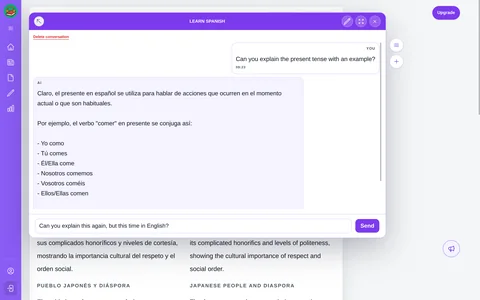
Meet the tutor that’s always within reach
This chat companion stays available while you read, so you don’t have to switch tabs or hunt through menus when something feels unclear. Tap it, ask your question, and get a short, focused answer right next to the text you’re working on.
A calm tutor that stays put
It’s there when you need it, quiet when you don’t.
Three steps to confident cross talk
- Highlight the sentence that is ambiguous and ask, “What does this mean?” or “Does this use a formal tone?”
- Share your interpretation (“I read this as…”) and ask the tutor to refine it for tone, register, or clarity.
- Save the new phrasing in a short journal note or translation so the insight sticks. Over time, you’ll see the patterns you struggled with—and the versions that finally made it click.
Keeping translation, chat, and journaling inside one viewport makes practice smooth—no context switches, no tabs.
Treat it like a mini lesson
Cross talk should take less than two minutes. Point, prompt, reflect—then move on. The goal is not to “solve” every sentence; it’s to keep your reading momentum while steadily improving accuracy.
Why the tutor matters
Because help is within reach, you spend more time comparing your explanation with the tutor’s answer—and less time searching for the right tool. That’s what makes cross talk fast: ask, refine, repeat, keep reading.
Ready to practice with a pro?
Three prompts, two rewrites, one reflection. That’s all it takes to turn confusion into confidence. Try it free today—open an article, run one cross talk loop, and keep moving.